Every site, and whether it's still worth the rent.
ALPO · Lease Portfolio Optimization
- Client
- Verizon
- Platform
- Desktop
- My role
- Research
- Prototyping
- Interaction design
- Dev handoff
- Design audit
- Status
- Phase 1 shipped
- Phase 2 in user testing
What is ALPO
Verizon rents thousands of physical sites across the US: rooftops, towers, land. Each one has a lease, a rent, running costs, and a date when it comes up for renewal.
ALPO is where an analyst decides whether a site is still worth what Verizon pays for it, and what to do if it isn't. The tool makes a recommendation on each one. The analyst's job is to check it, build the case around it, and take that case to the business.
Context
One recommendation, six places to look.
To make a single call on a site, an analyst weighed the location, the contract, the rent, operating costs, market conditions, and whatever alternatives sat nearby. If the answer was to move, they then had to find a viable site to move to.
The evidence for all of that lived in different places. Documents, spreadsheets, maps, and separate analysis tools. Analysts moved between them to assemble one view, which made the whole picture hard to hold at once.
Who we're solving for
Portfolio analyst
Does most of the analysis. Compares contracts, costs, market conditions and site options, then turns that into a recommendation for the business.
On-site / field user
Works closer to the physical site and local context. Their work depends on the analysis and decisions the portfolio team produces.
Research
What research kept telling me.
of portfolio analysts struggle to pull conclusions together across documents and analysis tools.
already use tools like Claude and Gemini to analyze contracts.
struggle to pull together and maintain analysis results across parameters for business conversations.
would prefer an application built around the tasks they actually perform.
One important nuance. The 2% who worked onsite still depended on the 98% doing the analysis. So improving the analyst workflow had downstream value for the whole process.
Current user journey
Site relocation decisioning, end to end.
Persona
JD (Juan) & Nina
The site relocation decision team. They want the AI to run the analysis and tell them what moving a site would actually do.
Scenario
HRR — high-rent sites, ranked 1–5 against the average and often carrying a termination deadline. Force Relos — expirations, landlord changes and termination notices that force a move, each one site-specific.
Expectations
Cut the rent paid on renewals and new builds, and optimize the portfolio — with the sharpest read on contracts expiring in the next one to five years.
| Stages | Data ingestion & scoring | Portfolio review & prioritization | Site-specific decision analysis | Execution & workflow |
|---|---|---|---|---|
| Goals | Find the best candidates for action. | Prioritize sites for the best ROI. | Get outcome data to support the team's decision. | Find a feasible site and start the relocation. |
| Actions | AI pulls rent, census, permits, network & usage data. | Flag HRR / Force Relo triggers, assign priority 1–5. | Predict relocation impact on profit, traffic & ROI. | Confirm the site can be vacated, check colocations, notify FW, log in NIBs. |
| Thoughts | Wants automatic scoring against regional and national averages. | ROI matters more than rent alone — protect performance. | Wants the outcome “package,” not the raw data. | The RF team's needs come first. |
| Pain points | Data is scattered and calculated manually across teams. | HRR deadlines loom; Force Relos are urgent & case-specific. | Revenue/TCO under-modeled; FW impact unclear. | New builds lack templates — rely on email & calls. |
| Emotions | 🙂Curious and hopeful | 😬Urgency / focus | 😌Relief | 😖Frustration |
| Opportunities | Centralize the data into a single 1–10 scoring model. | Filterable contract list with map & grid views. | Automate impact calculations, surface net ROI gain. | Integrate with the new-build & Planning process. |
Problem statement
When a lease comes up for renewal, analysts couldn't quickly tell which sites needed attention.
The portfolio was a flat list of contracts. Finding an underperforming site meant pulling revenue and expense data, running calculations, and researching the local market before the real analysis could even start.
Data scattered across different platforms
Hard to prioritize which sites need attention
Hard to pull together the information to analyze a site
Hard to build an evidence-backed case for the business
How I contributed
Built lo-fi prototypes off the early analysis
Took only what tested well through to hi-fi
Ran dev walkthroughs, handoff, and a design audit
The cadence
- Prototype walkthroughs with users, every other day
- Calls with business owners, twice a week
- Usability testing run by my onshore counterpart and the PM, for the deeper qualitative feedback
Layout explorations
Explore
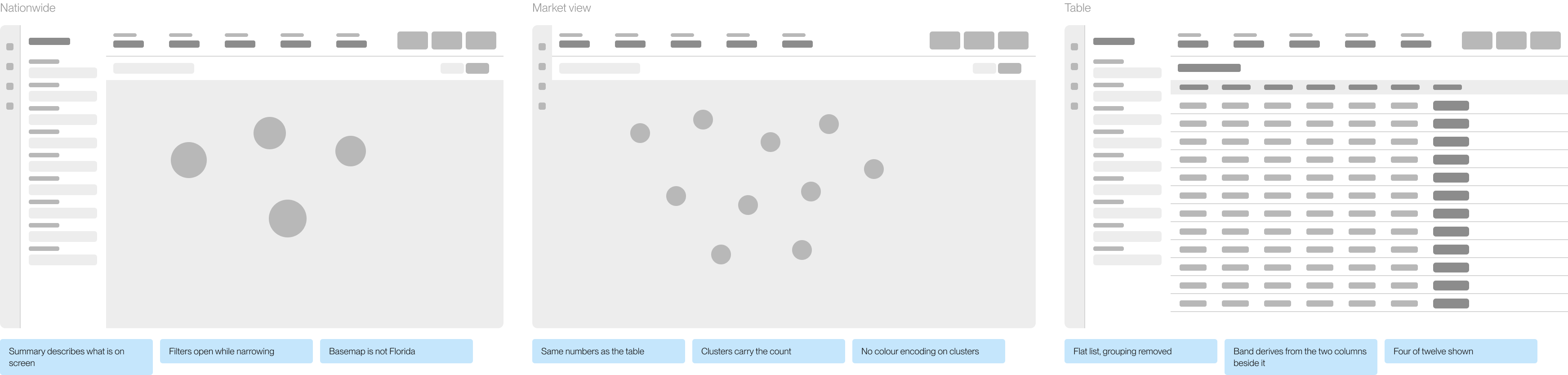
Analysis
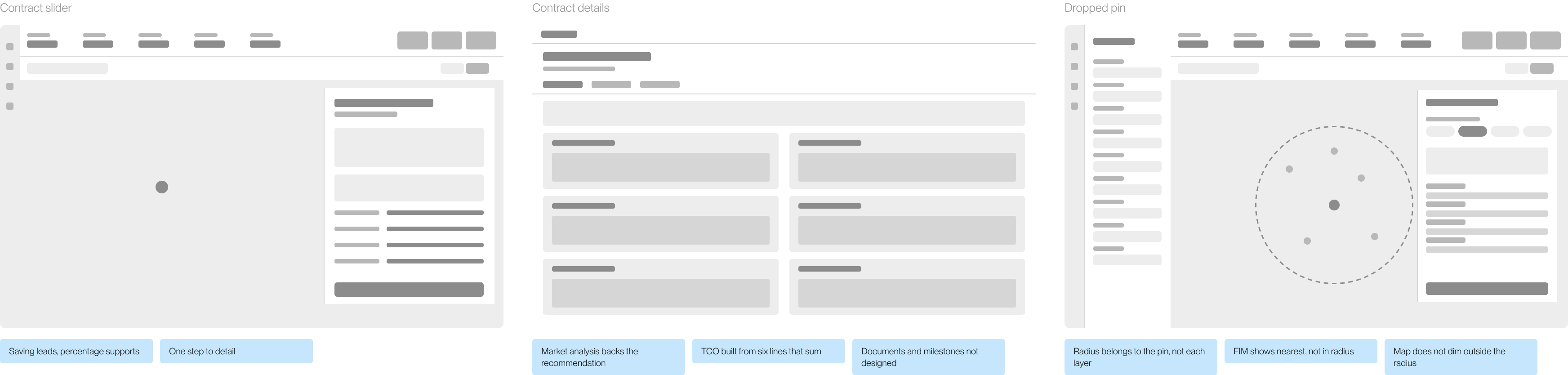
Iterations
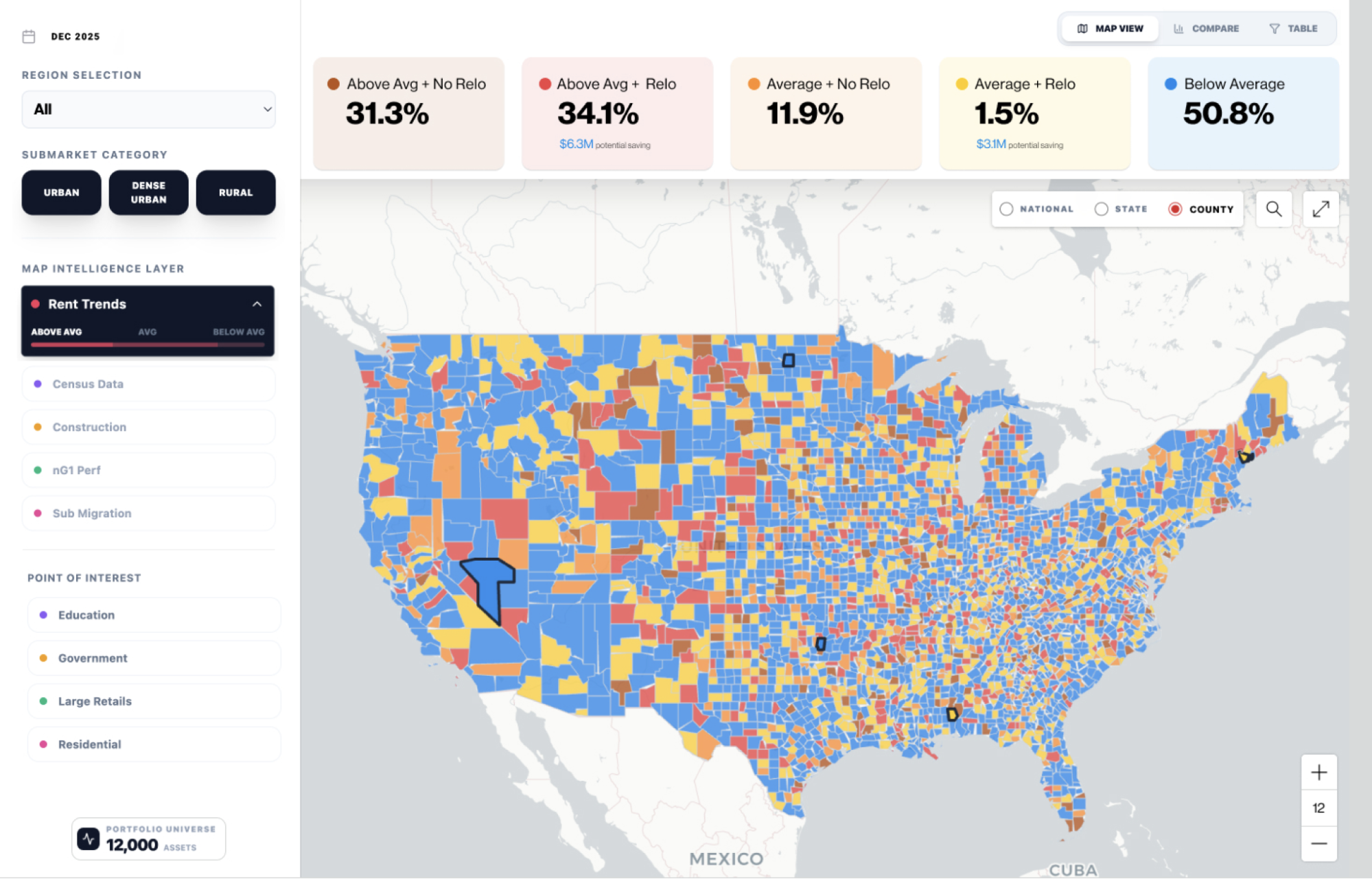
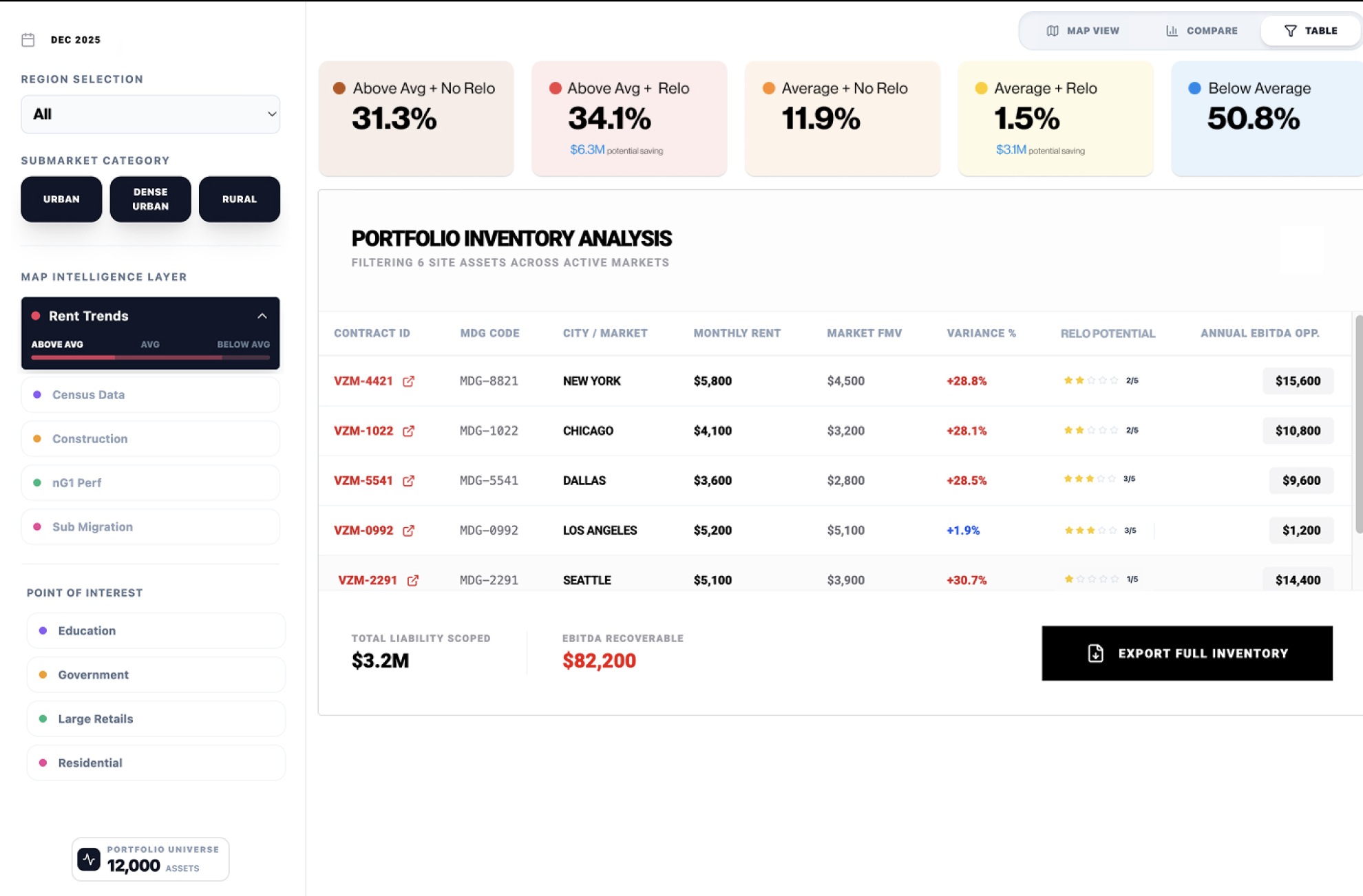
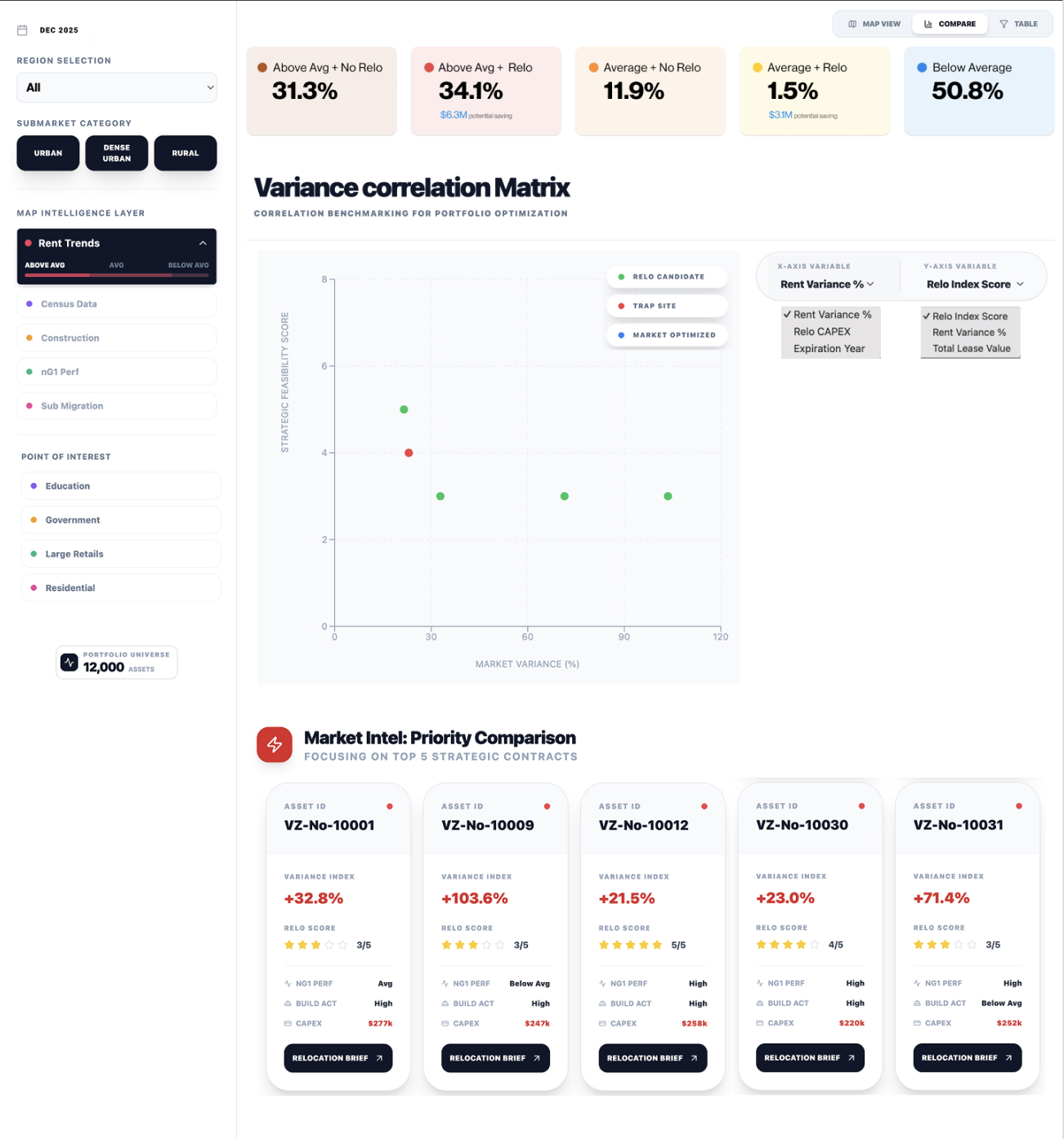
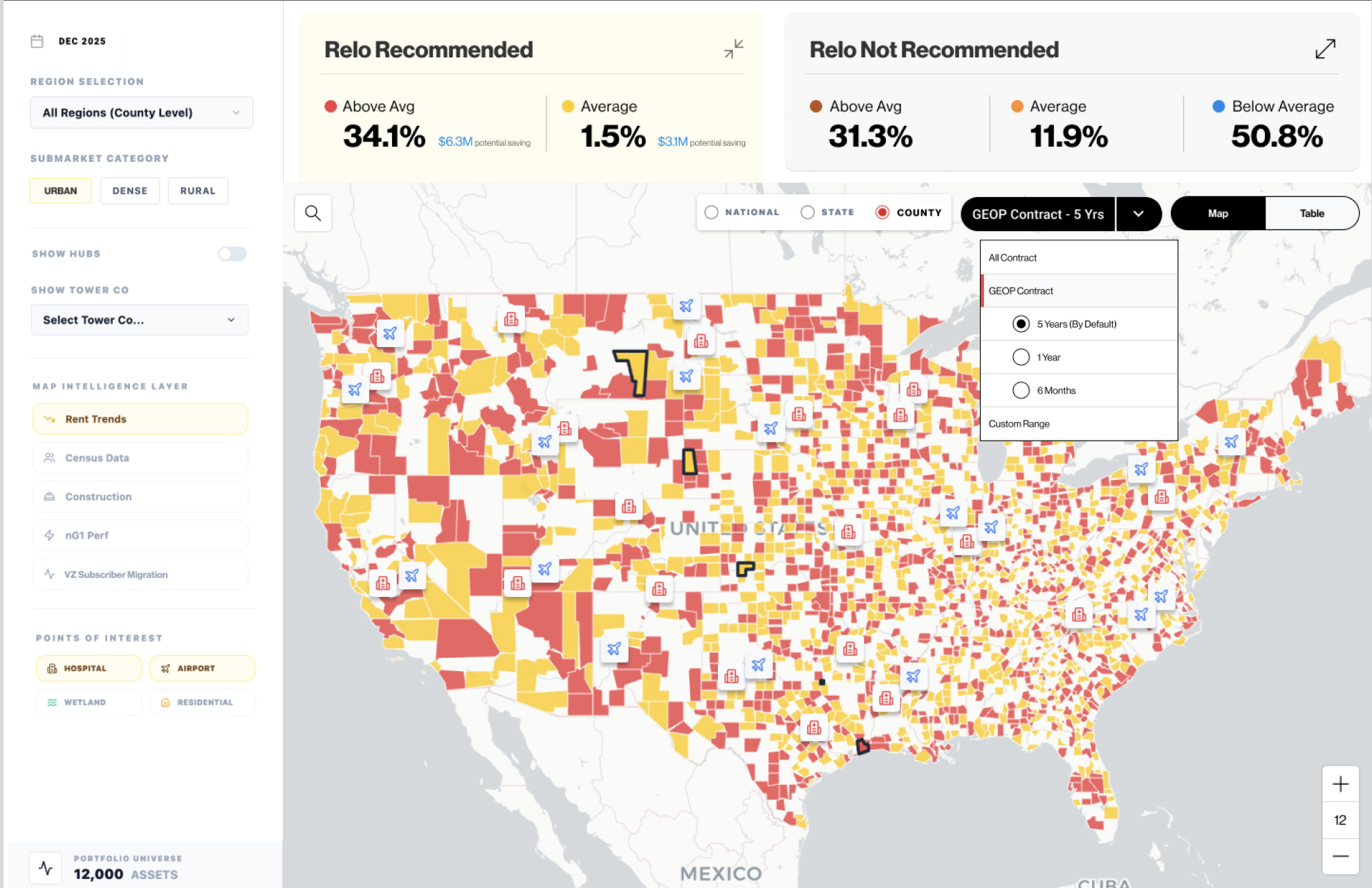
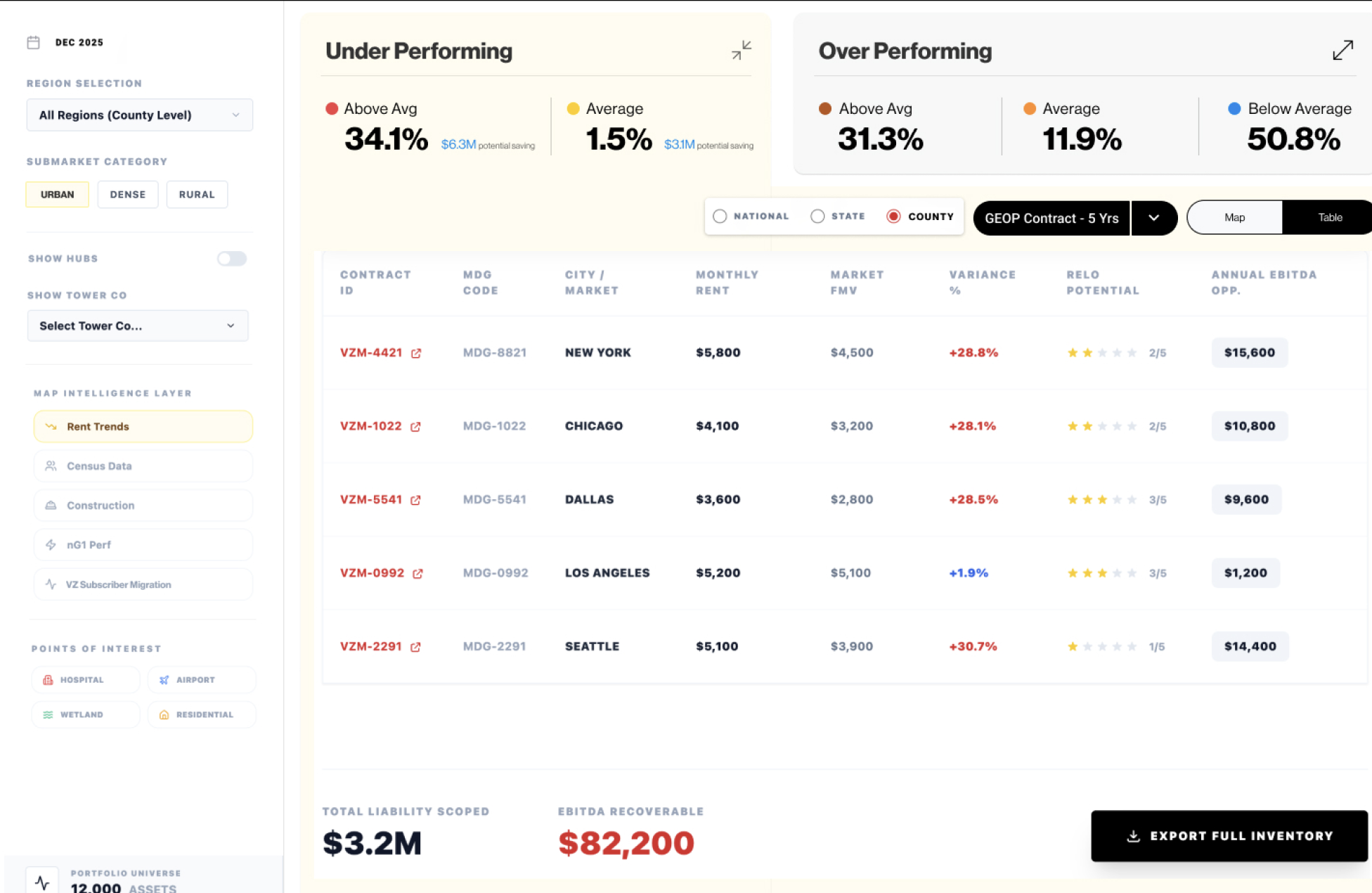
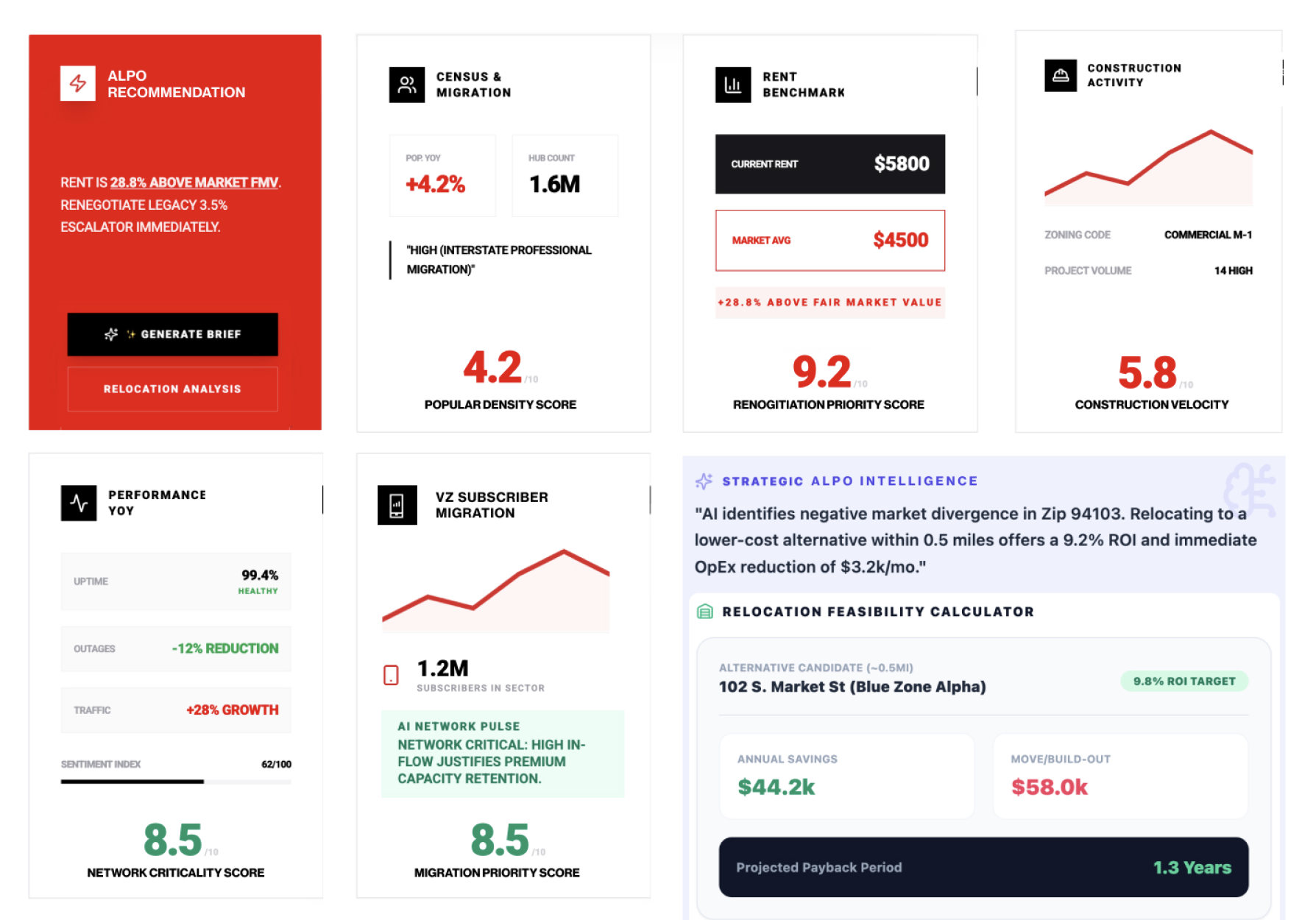
Nothing moved toward release until users had tested it and the business owners agreed on its impact. We kept refining the experience as we found new insights and more to improve.
Refined experience, phase 1
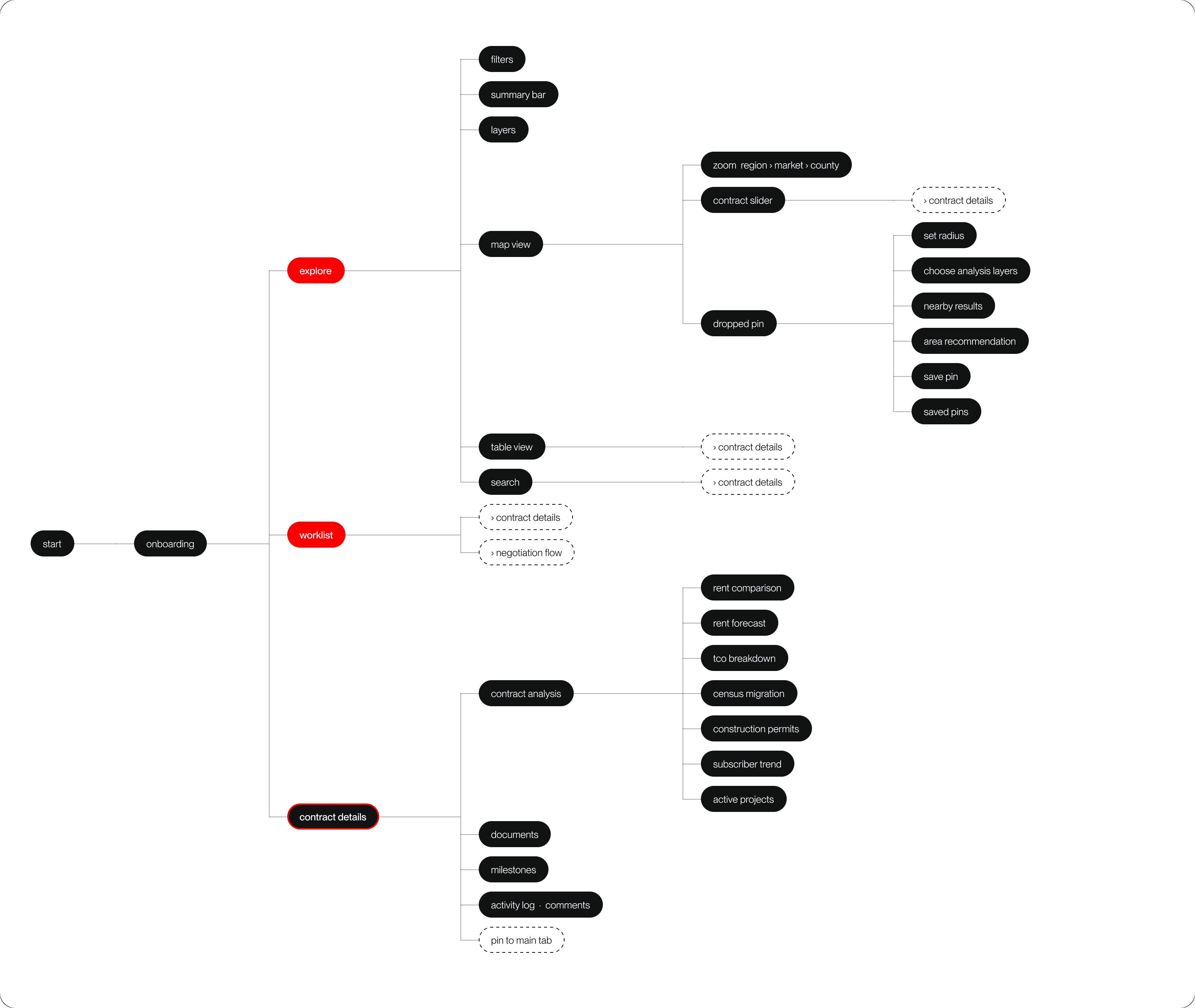
The flow we built for analysts.
Research gave us the analyst's current workflow. Phase 1 turns that into three ways into the same portfolio.
Highlights of the experience
Explore
Analysts start wide, then narrow in. Research showed the work begins with the whole portfolio and then closes in on a market. Location drives how analysts judge a site, so the map became the natural place to start.
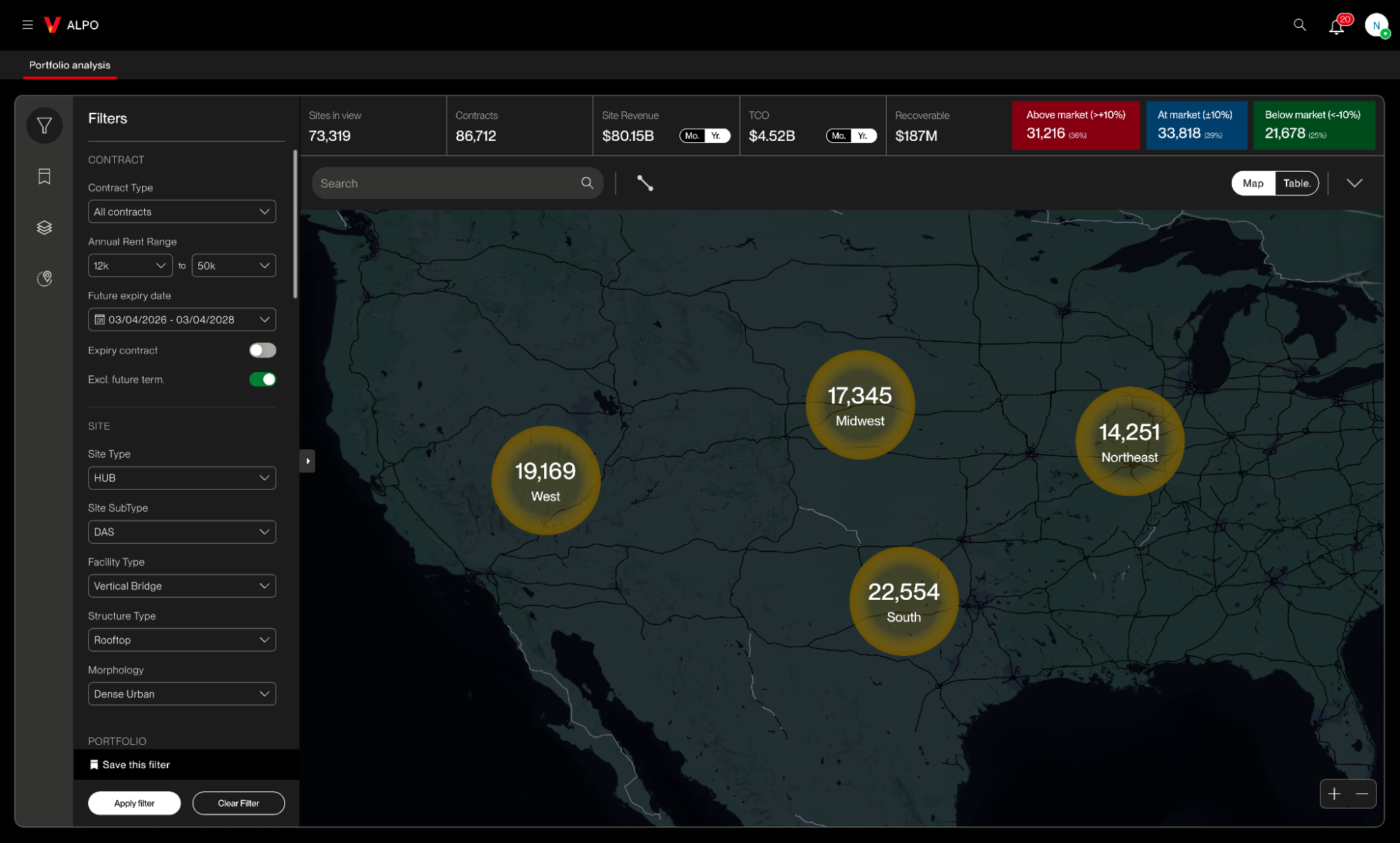
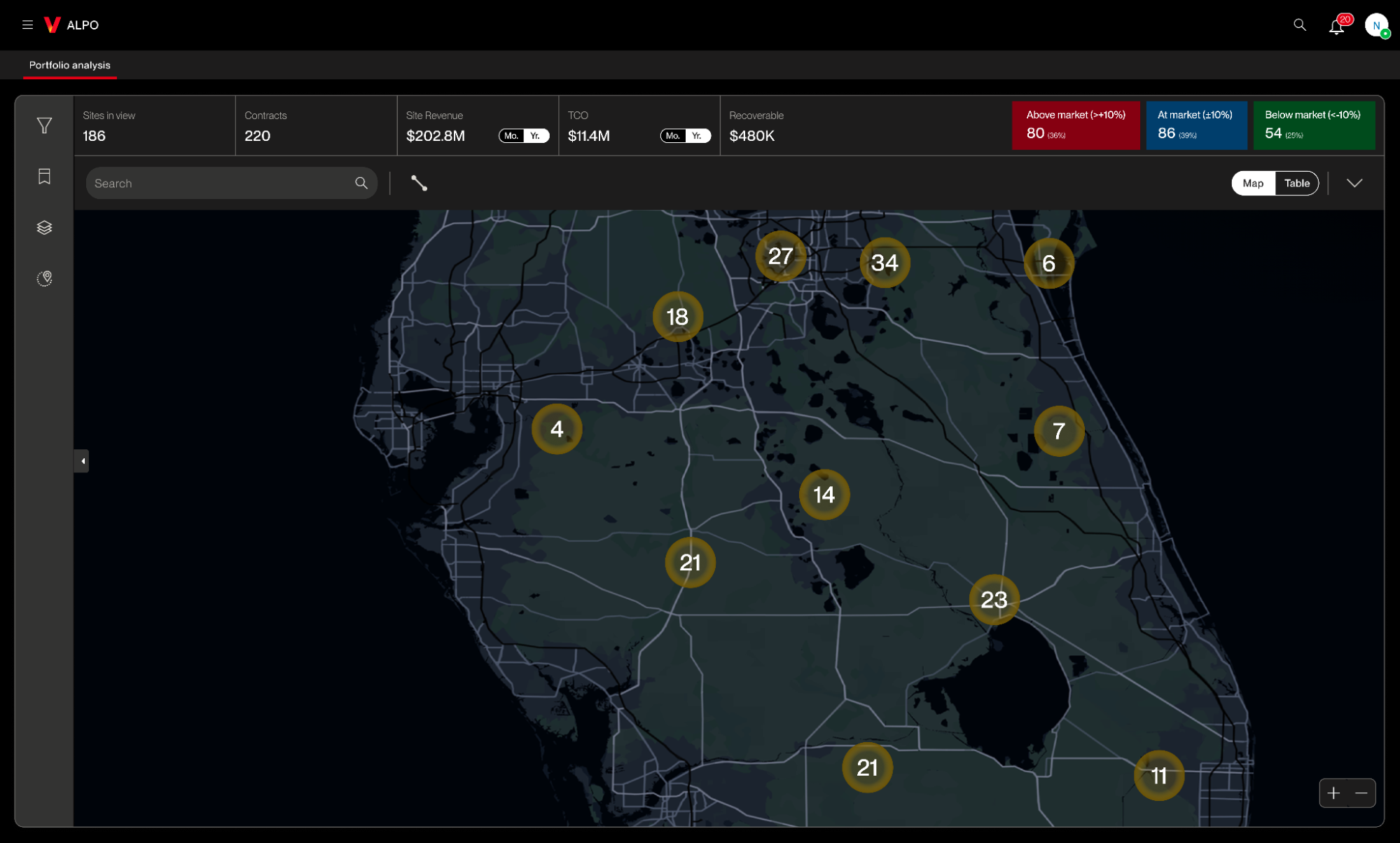
The map adds detail as you zoom. Moving from portfolio to market reveals more without changing the spatial context, so analysts can compare sites in an area and see what's happening around them.
Selecting a site keeps the map on screen. The site's analysis opens alongside it rather than replacing it. A site only makes sense in relation to its surroundings, so the recommendation, the site information, and the local context stay in one view.
The recommendation leads, the evidence follows. The panel opens on the call: current rent against a proposed rent, a confidence score, the annual saving, how far above county average the site sits, how many competitors are within three miles, and how many relocation alternatives are nearby. The contract details sit under it.
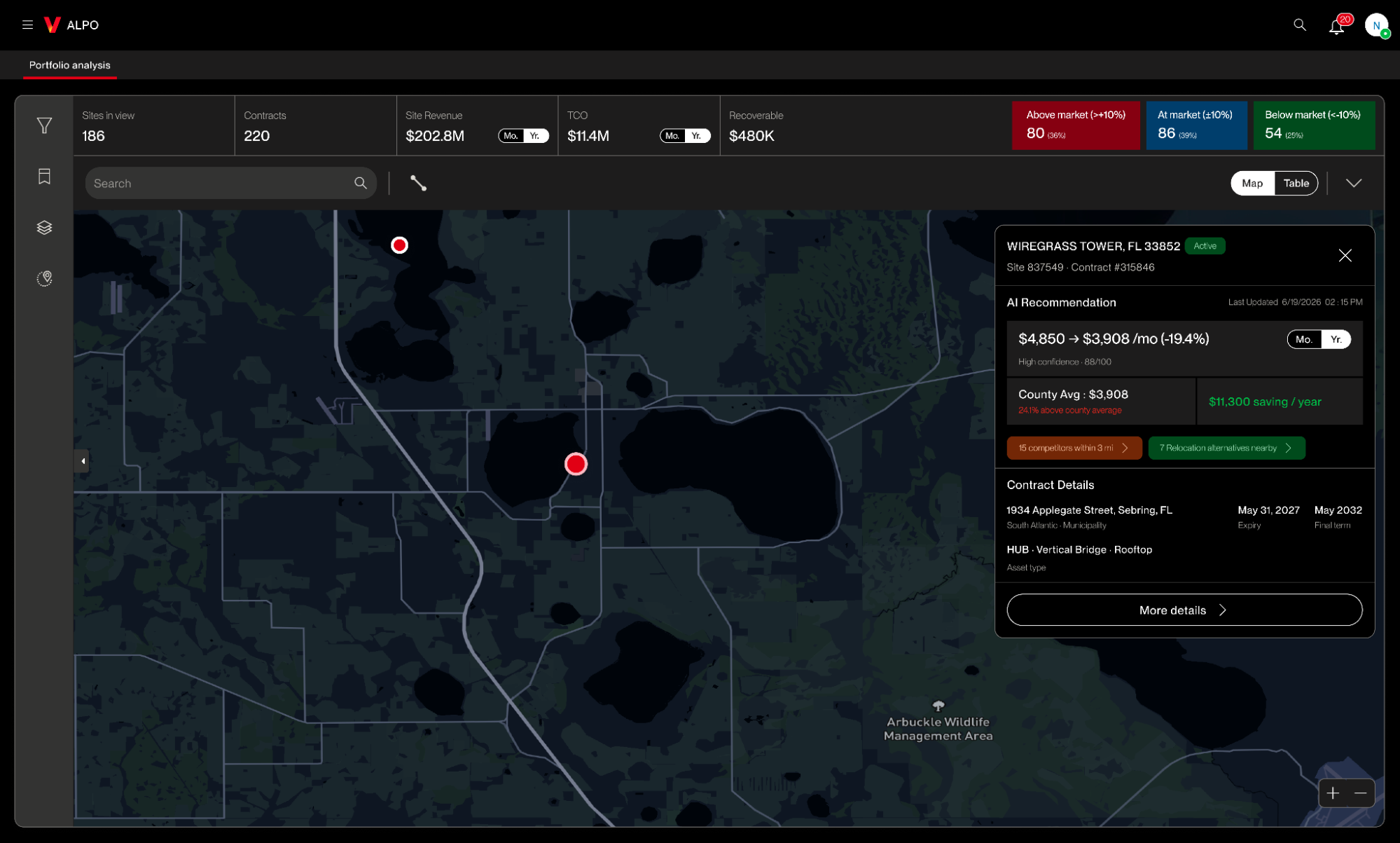
Friction solved — hard to prioritize which sites need attention.
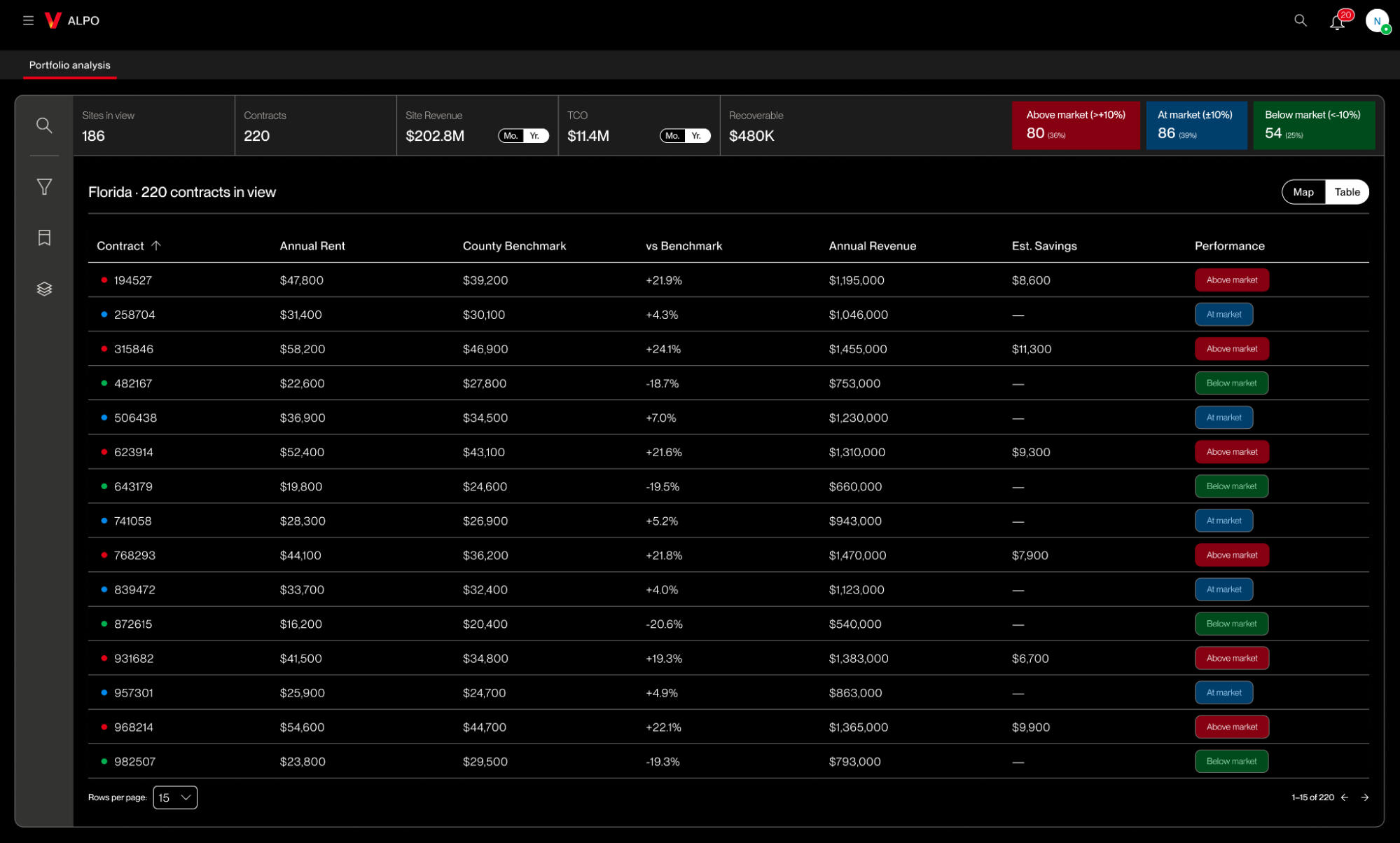
Table view
The map can't compare two hundred contracts. Analysts often need to scan a large set at once, which the map isn't built for.
Rent sits next to the county benchmark. The table makes it quick to see which sites are above or below market.
Summary on top, contract detail below. Top-level metrics give the portfolio picture. The table brings the same comparison down to individual contracts, so there's a clear path from the whole portfolio to the sites that need work.
Contract analysis
One page holding everything about a single contract, so an analyst can judge whether the current lease still makes sense before opening a negotiation.
The recommendation sits at the top of the page. A proposed rent against the current one, with a confidence score, the annual saving, the gap to county average, and the count of relocation alternatives nearby. Everything below it is the evidence for that number.
Documents and milestones live on the same record. Two tabs beside the analysis, so the lease paperwork and the dates that matter aren't in another system. An activity log with comments keeps the discussion attached to the contract instead of scattered across email.
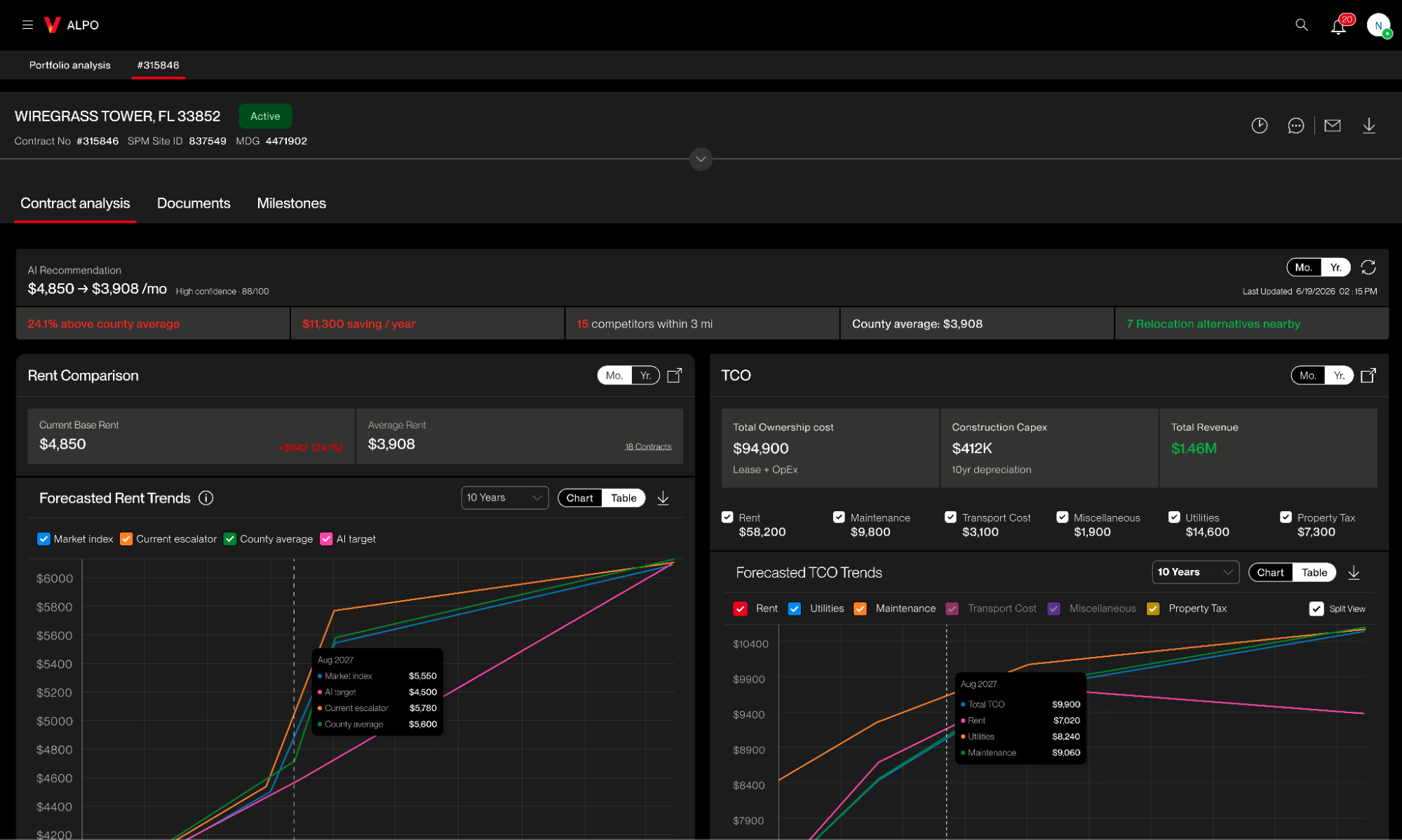
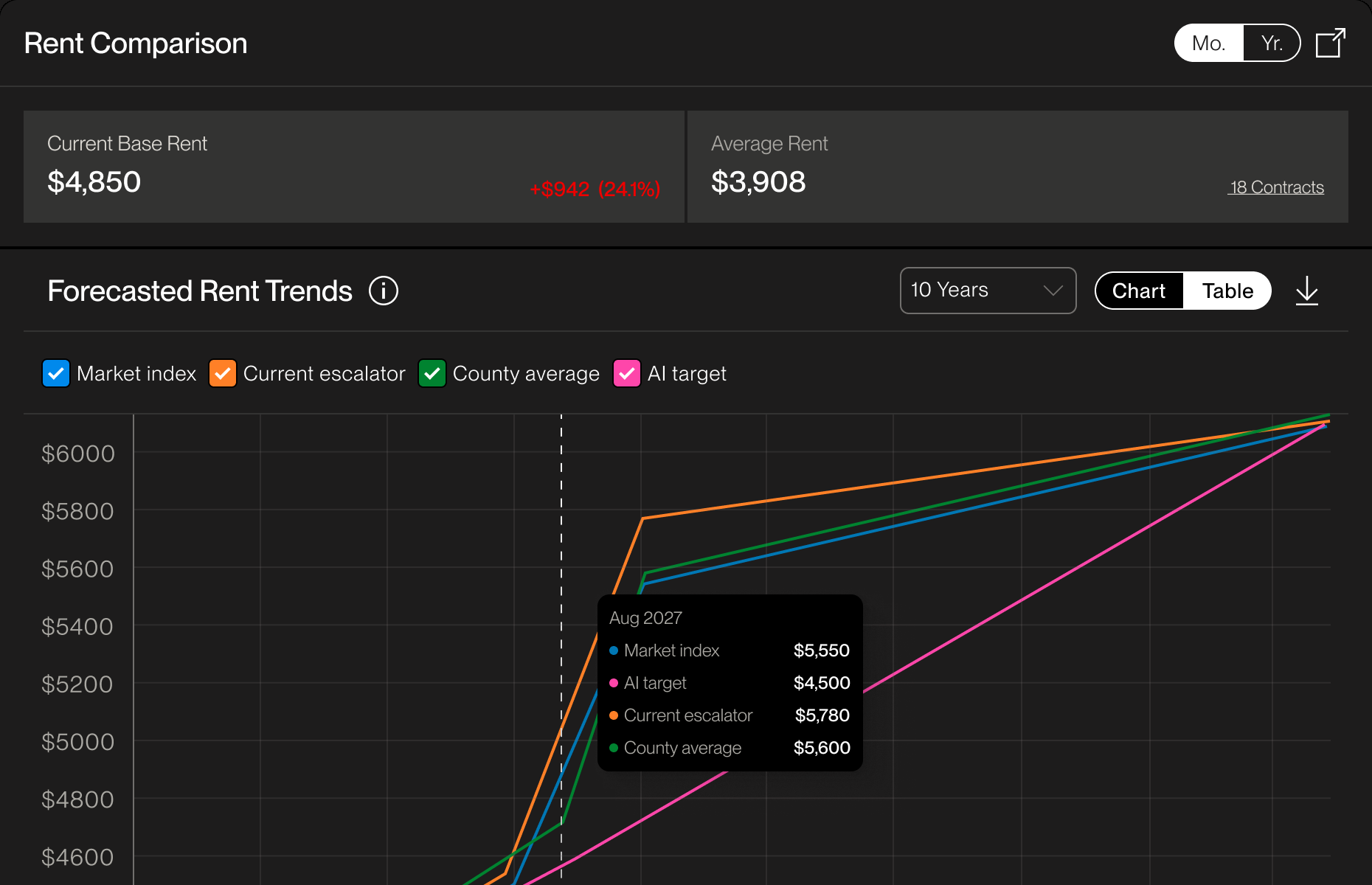
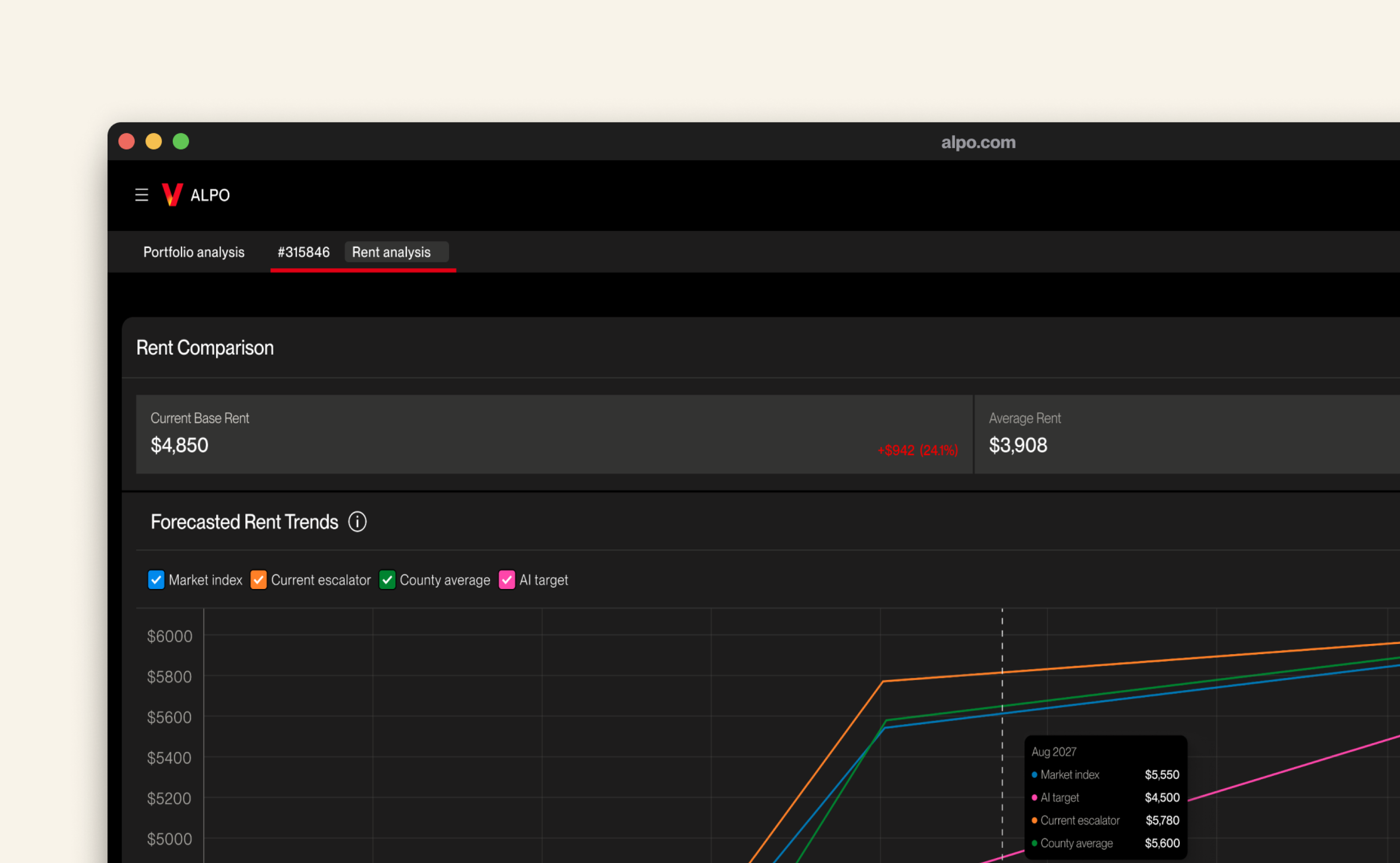
Current rent against market benchmarks. Base rent, average rent, and a ten-year forecast with the market index, the current escalator, the county average, and the AI target on one chart.
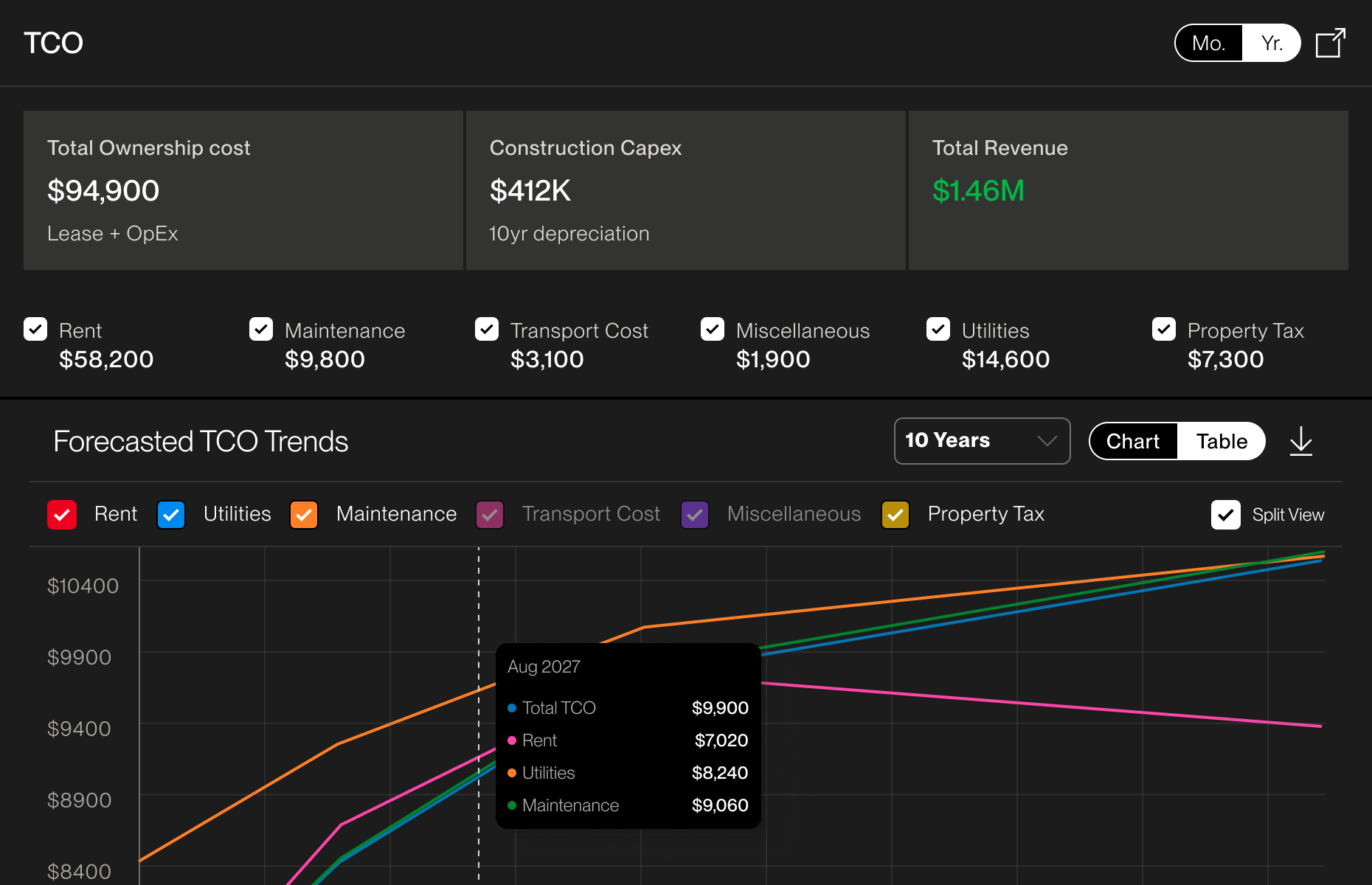
Total ownership cost, and where it's heading. Rent, utilities, maintenance, transport, property tax, and capex, broken out and forecast.
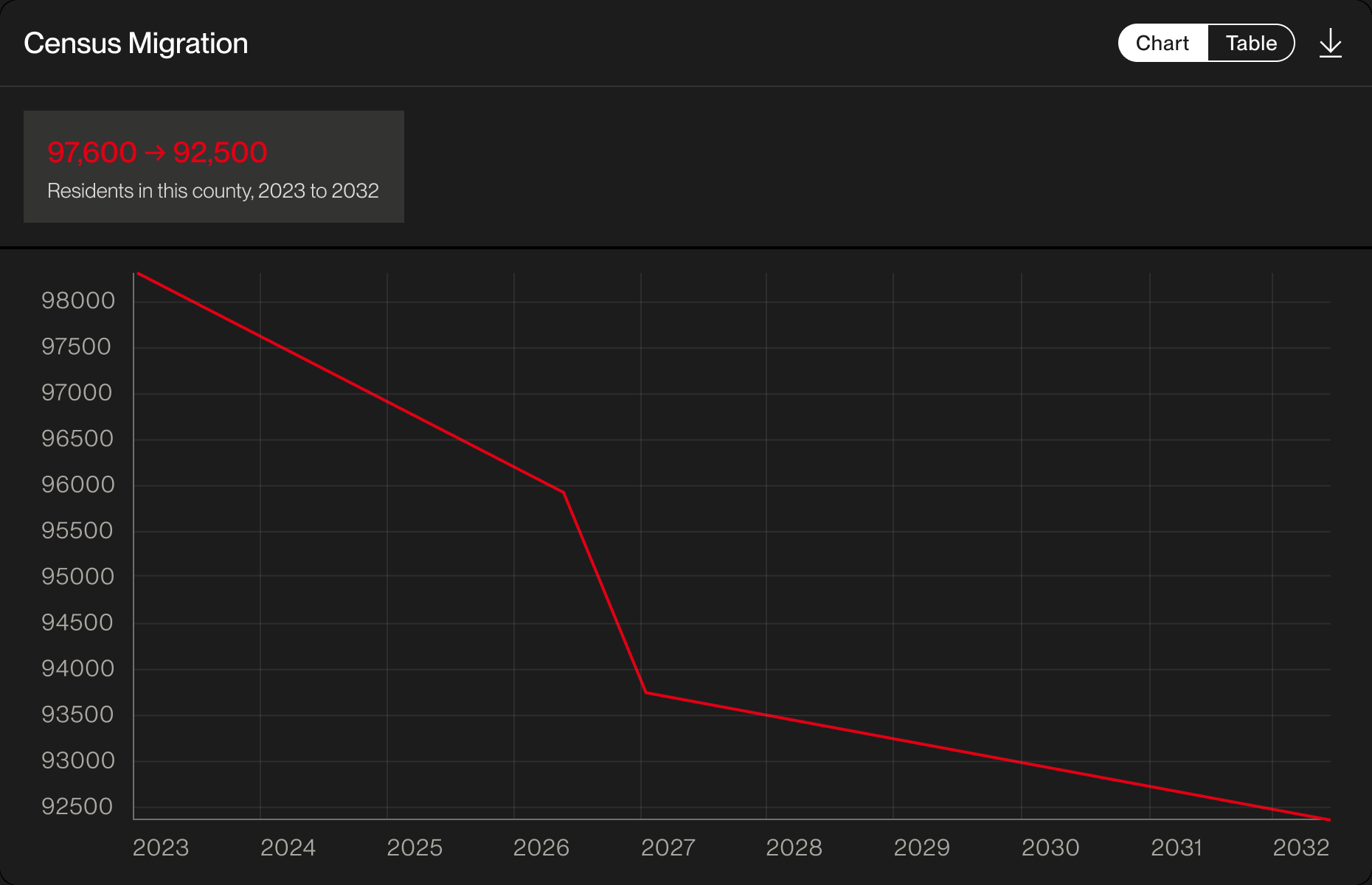
Population movement in the county. Census migration over a ten-year window, so analysts can see which way the local market is going.
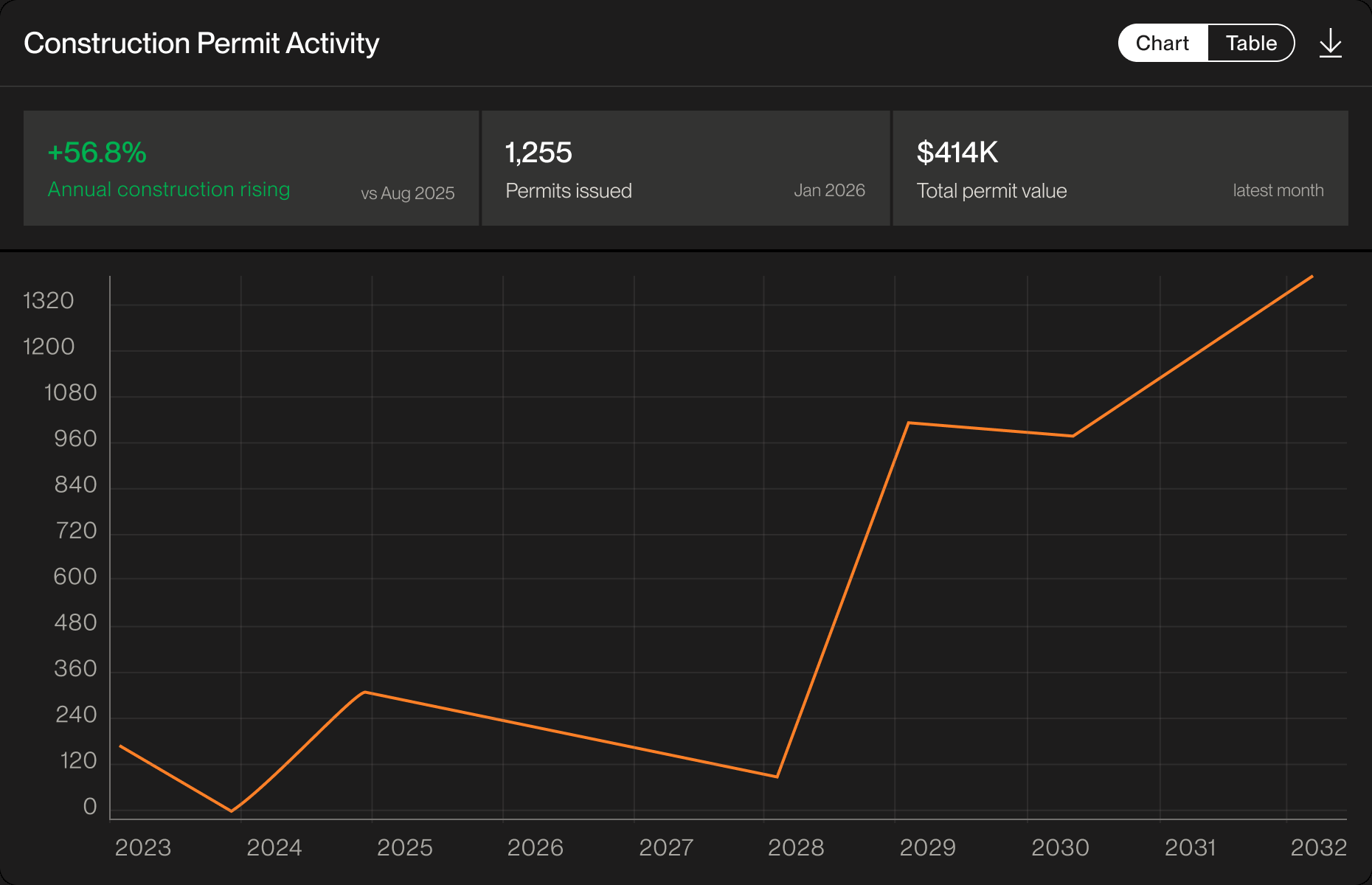
Construction activity in the area. Permits issued and total permit value, as a read on how the market is developing.
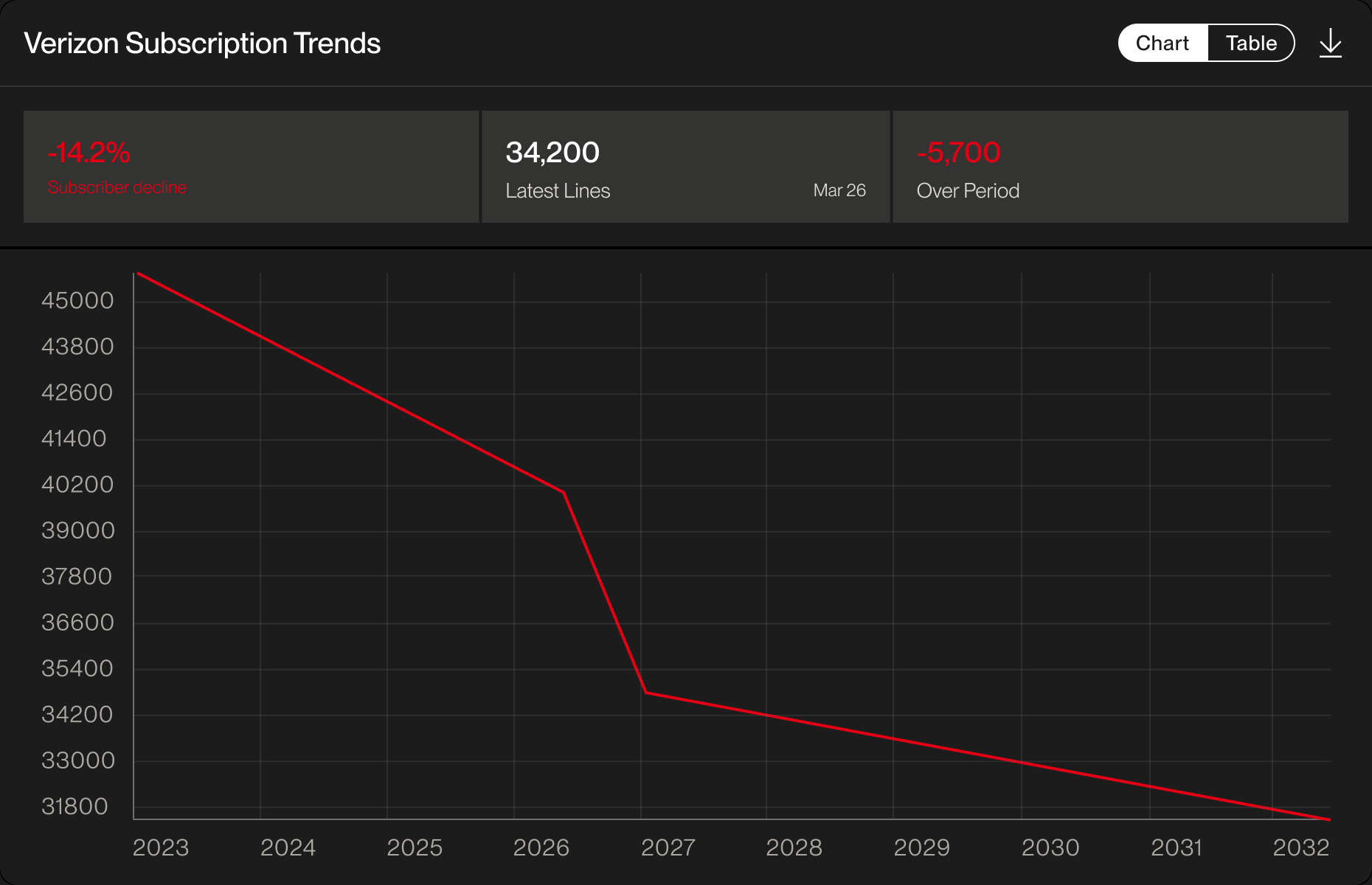
Verizon subscriber trends nearby. Demand in the market, measured by lines rather than by rent.
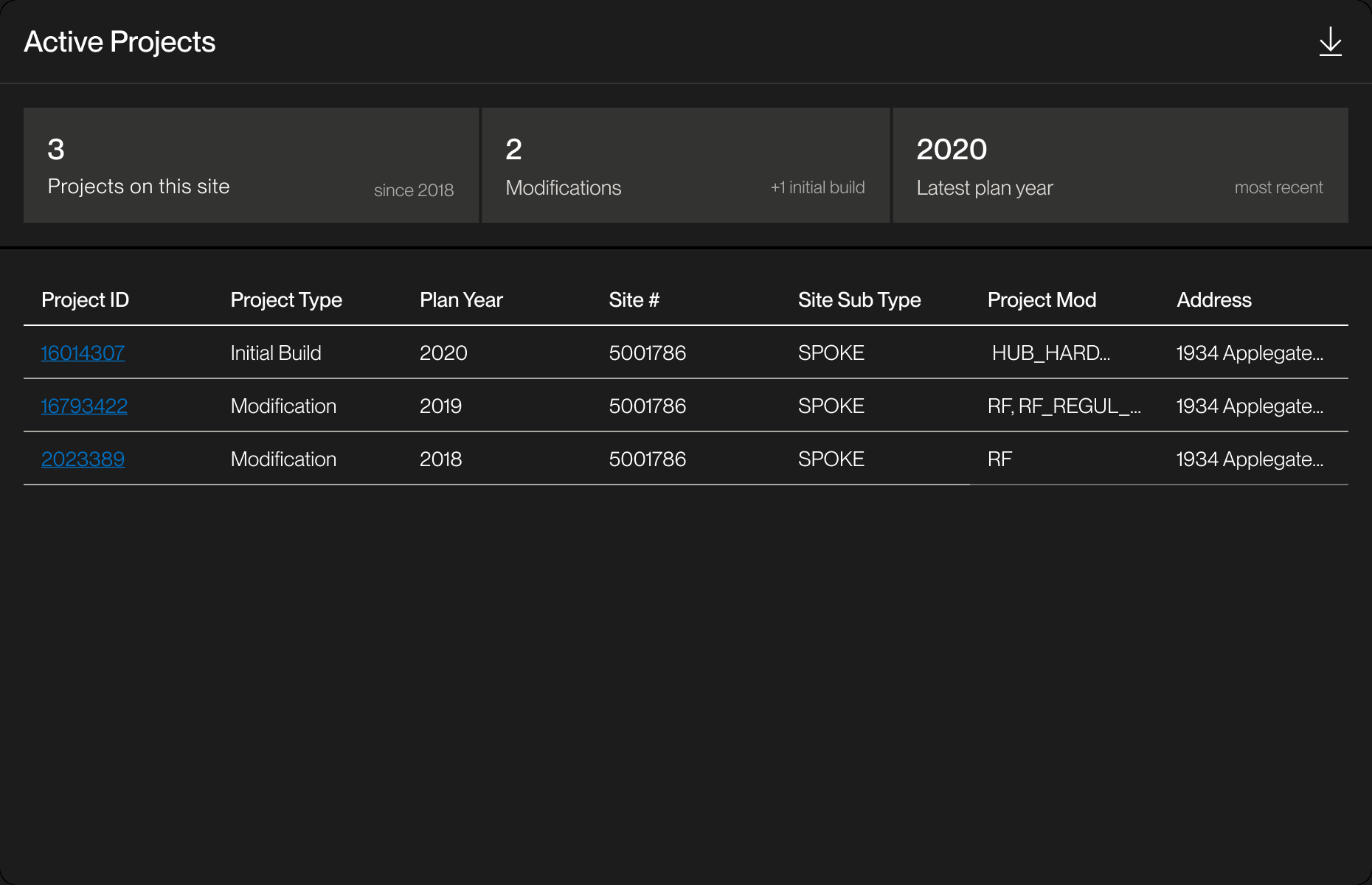
Projects at the site that complicate a move. Every build and modification on record, so analysts know what can actually be relocated and what makes relocation harder.
Friction solved — hard to pull together the information to analyze a site, and hard to build an evidence-backed case for the business.
Pin drop and analyze
Drop a pin on a possible relocation area and compare it against nearby contracts, competitor sites, tower companies, and market conditions inside a chosen radius. The area returns its own recommended rent, and the pin can be saved and returned to.
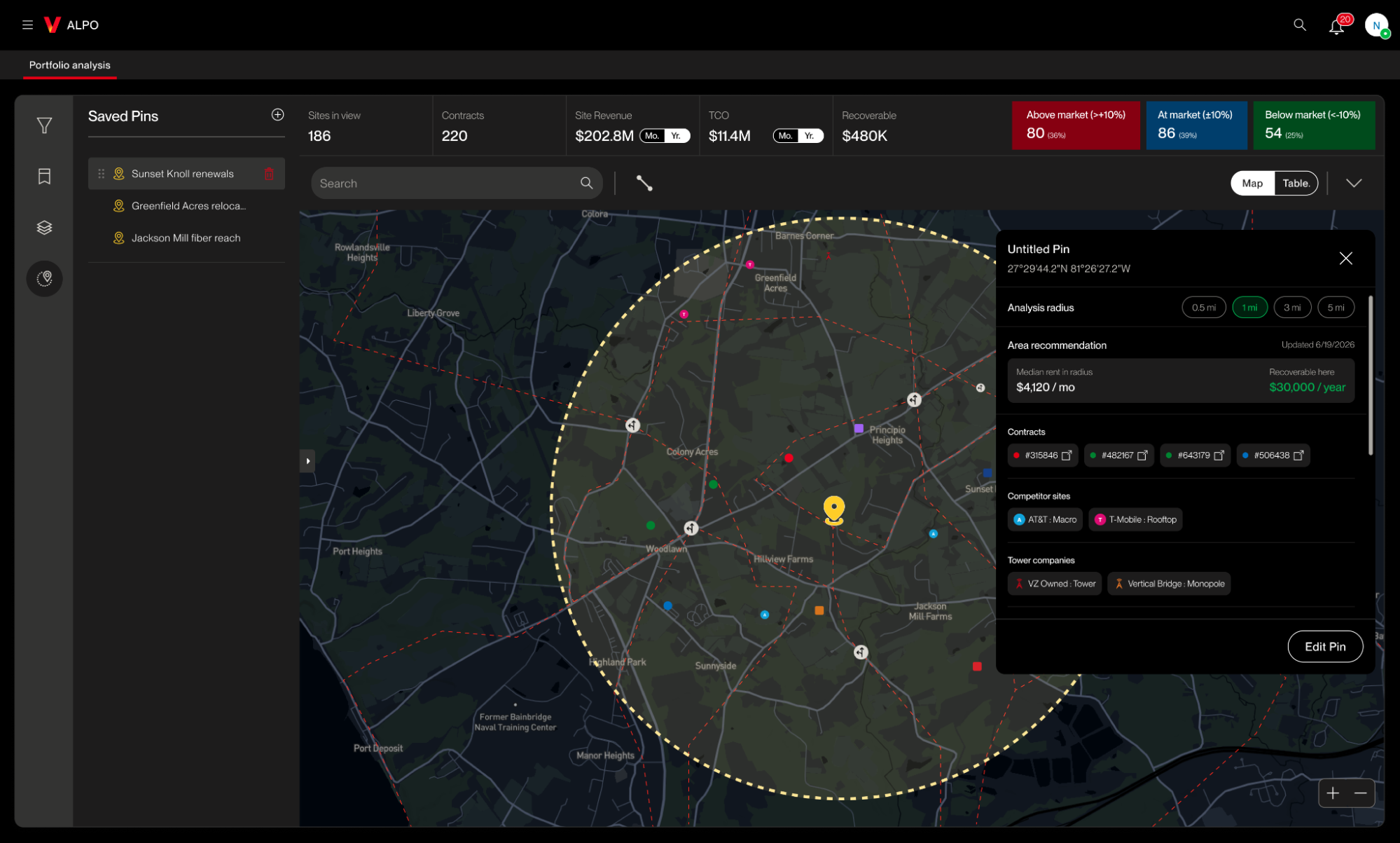
Four ways to narrow the view
Each one lets the analyst cut the scope or change the context of what they're looking at.
Filter
A specific set of sites.
Saved
Back to a specific analysis.
Layers
Specific data.
Drop pin
A specific area.
Open in a new tab
Analysts were screenshotting widgets to talk about them. In usability testing, we watched people pull single insights out of different widgets and save screenshots for follow-up discussions.
So any widget can open as its own tab. Analysts build the view around the conversation they're having with the business, whether that's market conditions, costs, or another part of the contract analysis.
Reflection
The bigger job was preparing analysts for the conversation.
We started with fragmented tools. The brief was straightforward: analysts worked across too many places, so bring the analysis into one.
Testing changed what the problem was. The bigger job turned out to be preparing analysts for conversations with the business.
The analysis was never the deliverable. Analysts needed a solid case for why a site should be renewed, renegotiated, or relocated, backed by the right evidence. That could take days, because it ran through several stakeholders and a lot of back and forth.
Less effort to reach the answer, more time on the argument. Making the analysis easier to assemble gave analysts room to focus on the conversations themselves, challenge the findings, and make better decisions with the business.
What's next: the worklist view
Everything above serves the portfolio analyst. A separate workflow for the lease optimization team is in user testing now and going through further changes. It gets added here once the results are in.